LTI 1.3 Certified  ·  Canvas  ·  Moodle  ·  Blackboard

AI Pre-Evaluation
Instructors Can Trust.

FairMark AI evaluates student submissions against your rubric — giving every instructor a transparent, evidence-backed starting point. You stay in control of every final grade.

View Docs
canvas.university.edu / fairmark / assignments / 7
FairMark instructor dashboard
80 / 100 ptsAI Suggested Score
🔒 Immutable AI Evaluation

Works with
Canvas
Moodle
Blackboard
LTI 1.3 · AGS Grade Passback · OIDC
How It Works

Submission to Gradebook
in Four Steps

FairMark plugs directly into your LMS — no new portals, no student training, no disruption to your workflow.

Step 01

Student Submits

PDF, PPTX, DOCX — submitted through the LMS as normal. FairMark captures it automatically via LTI 1.3.

Step 02

AI Evaluates

FairMark reads every slide and page, scoring each rubric criterion with direct evidence from the submission.

Step 03

Instructor Reviews

The AI evaluation is locked until the deadline. Agree, adjust, or override — then post your final note.

Step 04

Grade Posts Back

The final grade syncs to your LMS gradebook via AGS. Students get their score, feedback, and a PDF report.

Features

Built for Academic Integrity

Every design decision protects fairness — for students and instructors alike.

Immutable AI Lock

Evaluations are cryptographically timestamped on generation. No one can alter them after the fact.

Evidence-Grounded Scores

Each criterion cites exact passages, slides, or lines from the submission. No black-box scores.

LMS Grade Passback

Final grades sync to your gradebook automatically via AGS. Zero manual entry, zero copy-paste errors.

Late Penalty Engine

Per-assignment penalty rules applied automatically. Grace periods, partial deductions, hard cutoffs — all configurable.

PDF Evaluation Report

Every submission generates a downloadable PDF with the full rubric breakdown, evidence, and instructor decision.

Multi-Format Support

Handles PDF, PPTX, DOCX, and images — full text extraction, slide-by-slide analysis, page-level evidence.

In Action

Real Screenshots from Live Courses

FairMark runs entirely inside your LMS — no external portals for students or instructors.

1

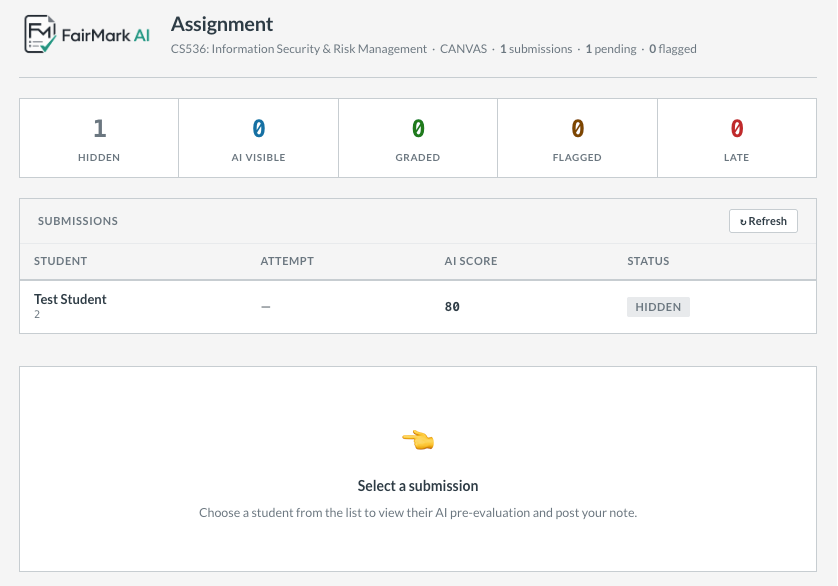
Instructor Dashboard

See every student's AI-suggested score, late status, and integrity flag at a glance — all inside Canvas or Moodle.

  • Score, status and flags at a glance
  • Hidden from students until you release
  • One-click into any submission's full detail
  • Works with any Canvas assignment setup
Instructor dashboard
AI pre-evaluation detail
2

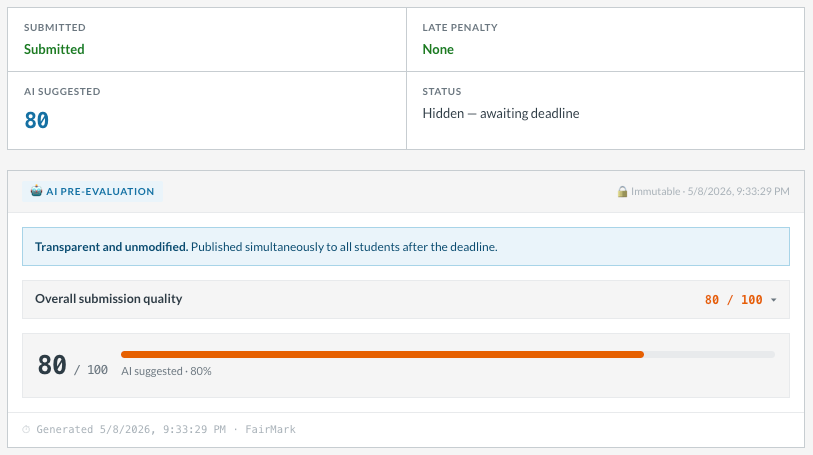
AI Pre-Evaluation Detail

The AI breaks down every criterion with a score, feedback, and a lock icon confirming the evaluation is immutable and timestamped.

  • Per-criterion score and written feedback
  • Timestamped and locked on generation
  • Late penalty calculated automatically
  • Published simultaneously after deadline
3

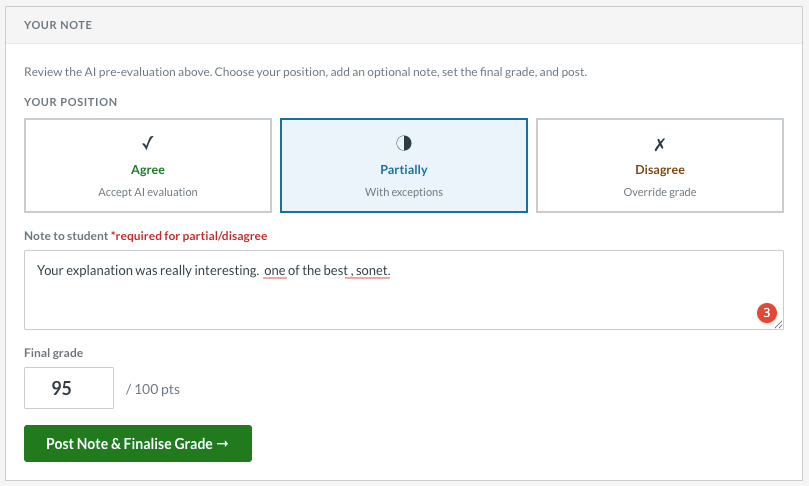
Instructor Review & Grade Finalisation

Agree with the AI, partially adjust, or override entirely. Add a personal note and post the final grade in one action.

  • Agree / Partially agree / Disagree positions
  • Optional personalised note to the student
  • Final grade with live LMS sync
  • Posted as a second comment — clearly attributed
Instructor review panel
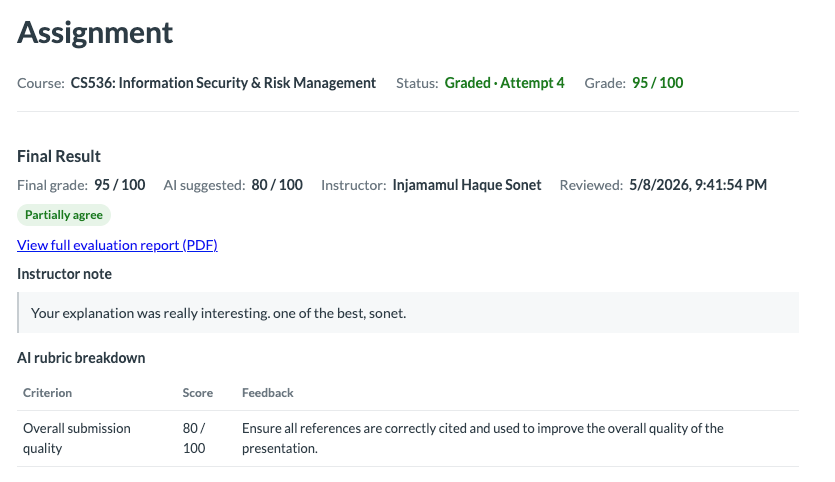
Student submission view
4

Student Submission View

After the deadline, students see the AI evaluation, instructor note, and final grade — together, transparent, and timestamped.

  • Full rubric breakdown with per-criterion feedback
  • Instructor position and final grade shown clearly
  • Downloadable PDF evaluation report
  • Simultaneous release — no student sees early
By the Numbers

Designed to Scale with Your Course

95%

Instructor time saved
per submission

LTI 1.3

Fully certified —
zero plugin install

3 LMS

Canvas · Moodle
Blackboard

100%

Instructor-reviewed,
never auto-graded

Pricing

Simple, Transparent Pricing

Start free with the self-hosted version. Move to cloud when you're ready.

Starter
$0/month

Self-hosted. Perfect for a single course or research project.

  • Unlimited submissions
  • Canvas LTI 1.3 integration
  • Full rubric evaluation
  • PDF report generation
  • Community support
Get Started with OpenSource
Most Popular
Institution
$299/month

Cloud-hosted. Multi-LMS. Ideal for departments and faculties.

  • Everything in Starter
  • Canvas, Moodle & Blackboard
  • Cloud hosting & daily backups
  • Priority support with SLA
  • Custom rubric policies
  • Advanced integrity detection
Enterprise
Custom

University-wide deployment, on-premise options, and a dedicated account team.

  • Everything in Institution
  • On-premise deployment
  • SSO & identity federation
  • Custom AI model fine-tuning
  • Dedicated account manager
  • White-label option
Get Started

See FairMark in Your LMS — Live

Book a demo with your own rubric and a real submission. We'll go from setup to graded result in under 30 minutes.

  • Canvas, Moodle & Blackboard
  • 30-minute setup, no IT involvement required
  • Full audit trail — every grade decision is logged